October 14, 2026: Decide who can delete recordings
· One min read

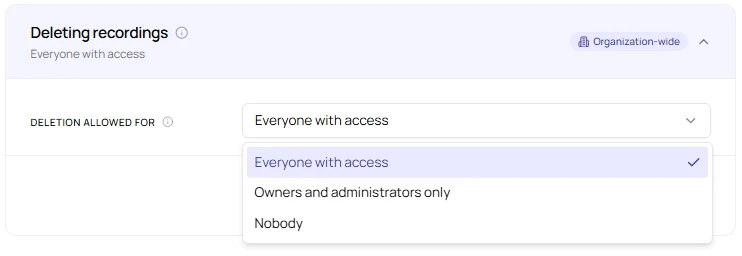
More control over your recordings: owners and admins can now decide who is allowed to delete recordings in their organization. Until now, anyone with access to a recording could delete it for every participant.
This is useful if recordings have to be kept, for example for documentation, or if you want to make sure nobody deletes a recording by mistake.
What's new?
- Deleting recordings: a new section in the privacy settings, under Storage Limitation
- Three options: Everyone with access (the default, same as before), Owners and administrators only, or Nobody
- Clear feedback: anyone who is not allowed to delete sees Delete grayed out, along with a short explanation
- Not affected: automatic deletion and replacing a recording when Sally joins again or a file is uploaded work as before
- Where to find it: Settings → Data Protection → Storage Limitation
Want the details? See Who can delete recordings.