Invitation & attendance Status
The invitation status and attendance status help you understand how participants responded to a meeting invite and whether they actually joined the meeting.
- Invitation status shows how a person reacted to the calendar invitation (e.g. accepted, declined).
- Attendance status shows whether the person was actually present in the meeting.
This allows you to quickly identify discrepancies between planned and actual participation.
Quick navigation
1. View invitation & attendance status
To check the status of participants in a meeting:
- Open the desired meeting.
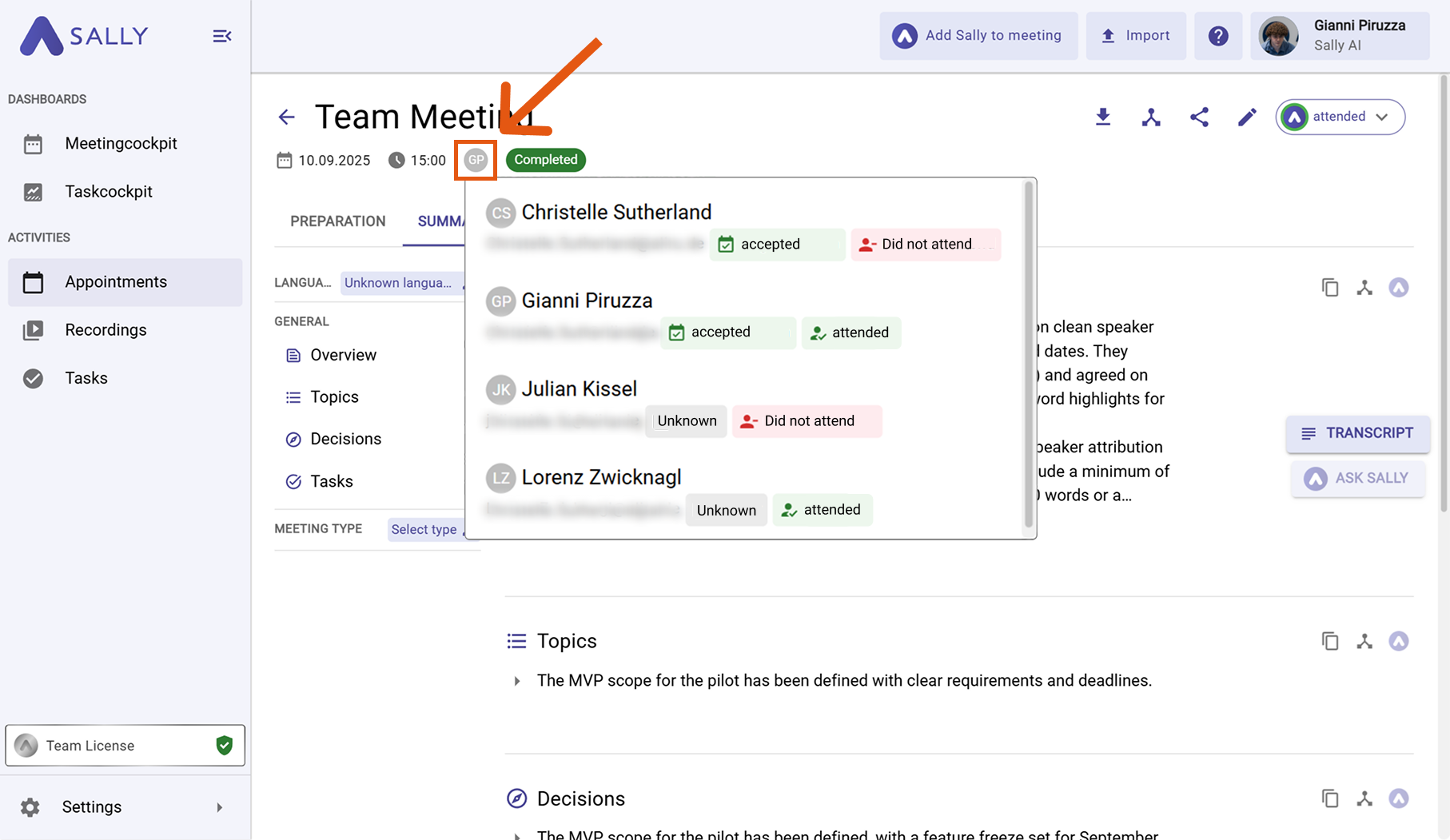
- Hover over the participant icons at the top.
Set the inactivity waiting time
A detailed overview will appear, showing both the invitation status (left column) and the attendance status (right column) for each participant.
2. Meaning of all statuses
2.1. Invitation status
The invitation status indicates how a participant responded to the calendar invite.
| Status name | Short description | Detailed explanation & examples |
|---|---|---|
| Declined (10) | Invitation was declined | The participant actively declined the meeting. A colleague clicks “Decline” in Outlook because they have a scheduling conflict. |
| Accepted (20) | Invitation was accepted | The participant confirmed the meeting. Someone clicks “Accept” and plans to attend. Note: This does not guarantee actual attendance. |
| Tentative accepted (30) | Invitation marked as “Maybe” | The participant is unsure. The participant accepted the meeting under reservation (“Tentative”), meaning they might join depending on other priorities or schedule changes. |
| No response (40) | No reaction to the invite | The participant has not responded at all. The invite is still unanswered in their calendar. |
| Organizer (50) | Person is the organizer | This person created the meeting. |
| Unknown (100) | Status not available | The invitation status cannot be determined. Example: In some systems, only the organizer can see responses—other participants will see “Unknown” instead. |
2.2. Attendance status
The attendance status indicates whether the participant actually joined the meeting.
| Status name | Short description | Detailed explanation & examples |
|---|---|---|
| Did not attend (10) | Person did not join | The participant was invited but did not attend. |
| Attended (20) | Person was present | The participant joined the meeting. |
| Unknown (100) | Attendance unclear | It could not be determined whether the person attended. Example: No reliable tracking data is available (e.g. missing recording or incomplete system data). |