October 26, 2026: Update summaries to the latest template version
· 2 min read

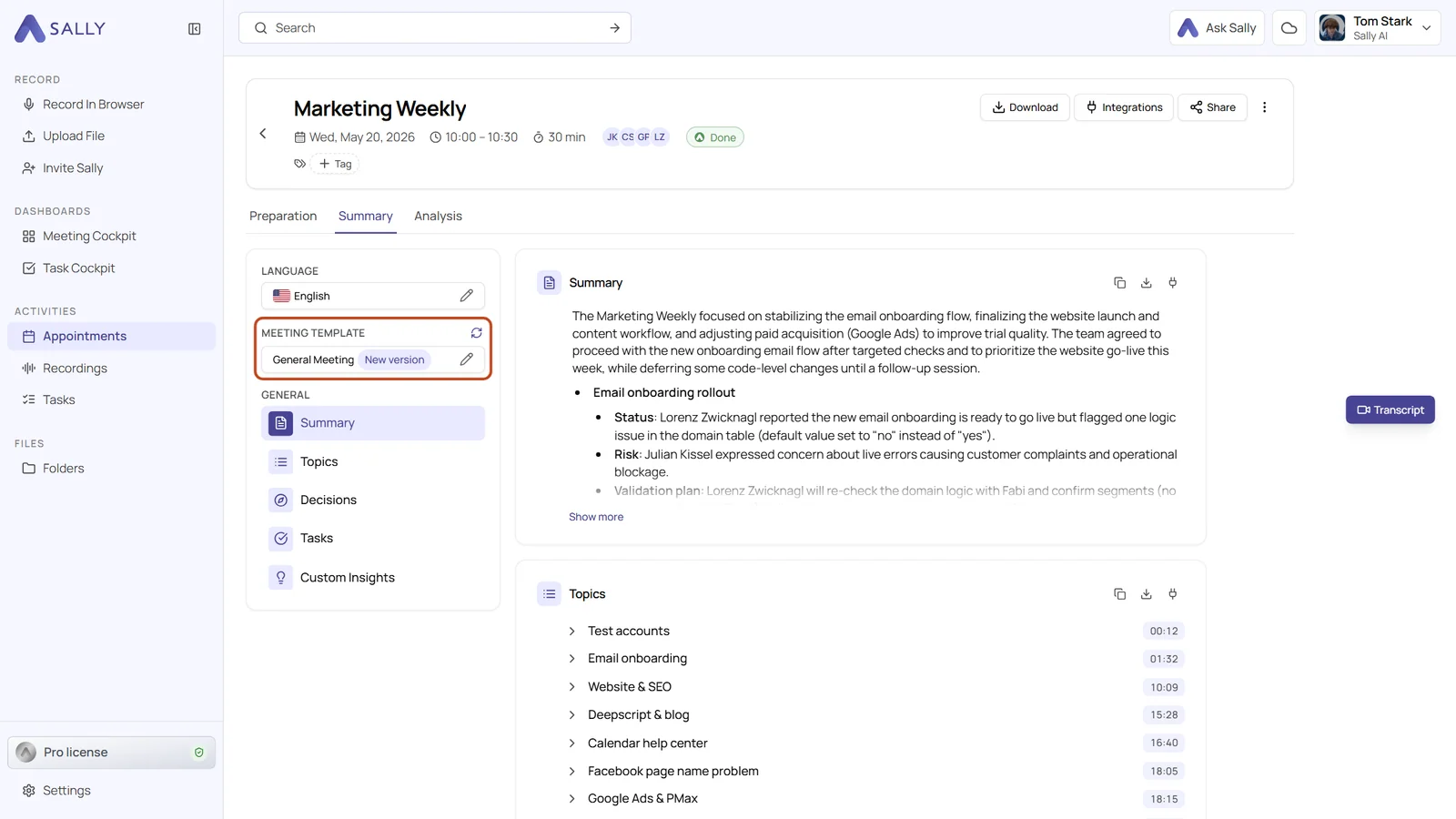
Summaries now tell you when their meeting template has changed. As soon as someone publishes a new version of a template, the template field of an existing summary shows New version, and one click on the update icon brings the summary up to date.
Existing summaries keep the version they were written with until you decide otherwise. Nothing changes behind your back, and you still get the improved structure whenever you want it.
What's new?
- New version badge: in the Summary tab, the template field shows New version once a newer version of the template has been published
- Update in one click: the update icon next to Meeting template skips the selection dialog. Click Apply again, and Sally writes the summary with the current version, in every language of the recording
- Current version everywhere: Optimize transcript with Generate a new summary, Save & regenerate summary and picking the same template again in the selection dialog also use the current version
- Hybrid meeting when optimizing: the Optimize transcript dialog now has the Hybrid meeting field. If the voices from a shared room ended up under one name, change it there and Sally writes the transcript again. Your choice is saved to your own appointment, the series stays as it is
Good to know
- The current version can change the structure of the summary, and the new summary replaces the previous one
- Only the owner or someone with write access can update a summary. With read access, the icon stays inactive
Want the details? See Updating a summary to a newer template version and Optimize transcription.