September 17, 2026: Assign your organization account to a Sally partner yourself
· 2 min read

You can now assign your organization account to a Sally partner yourself. If you use Sally with your own online subscription and want a partner to set it up, support your team and bill your licenses, all you need is their partner number. You send the request right from Sally, and the partner accepts it.
Your data, members and licenses stay exactly as they are. Before you send anything, Sally shows you what changes once the partner accepts.
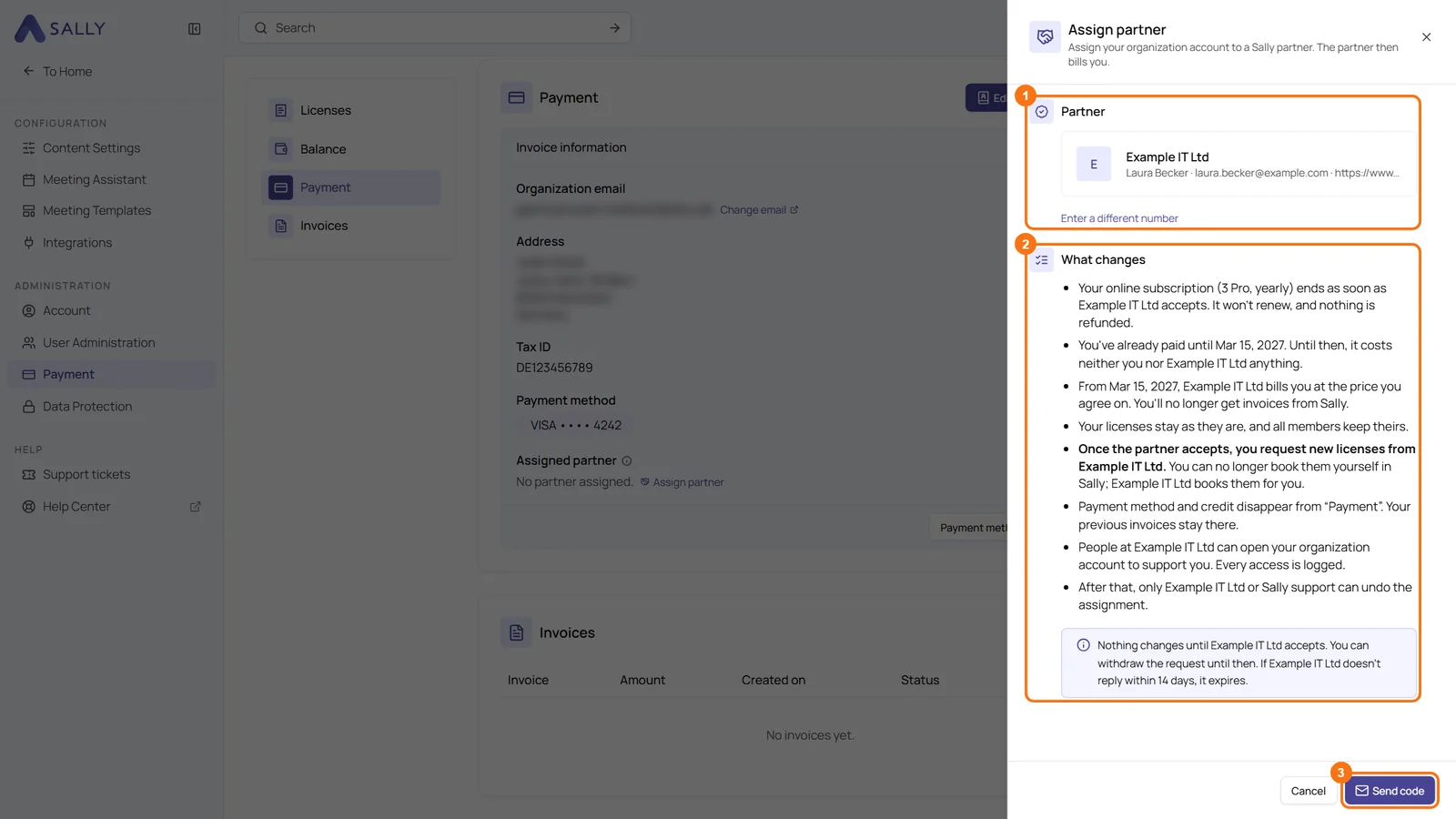
What's new?
- Assigned partner under Payment: in Settings › Payment, the Invoice information card has the line Assigned partner with the link Assign partner. Only the owner of the organization account can use it
- Check before you send: after you enter the partner number, Sally shows the partner it belongs to and, under What changes, everything that happens once the partner accepts
- Confirmed by email: a code that is valid for 10 minutes confirms the request with Request assignment
- Status at a glance: the line shows whether your request is open, declined or expired. The partner has 14 days to accept, and until then you can Withdraw the request
What changes once the partner accepts
- Your online subscription ends without renewal or refund. What you have already paid stays paid until the end of the current billing period, after that your partner bills you
- Your licenses stay, and you request new ones from your partner
- People at your partner can open your organization account to support you, and every access is logged
Want the details? See Assign a partner.