October 30, 2026: Take agenda items from minutes, quotes and other documents
· 2 min read

Your agenda can now come straight from a document. Upload the minutes of the last meeting, a prepared agenda or a quote, and Sally suggests the items she finds in it. Next to the invitation and the last meeting of the series, this is the third way to fill an agenda without typing.
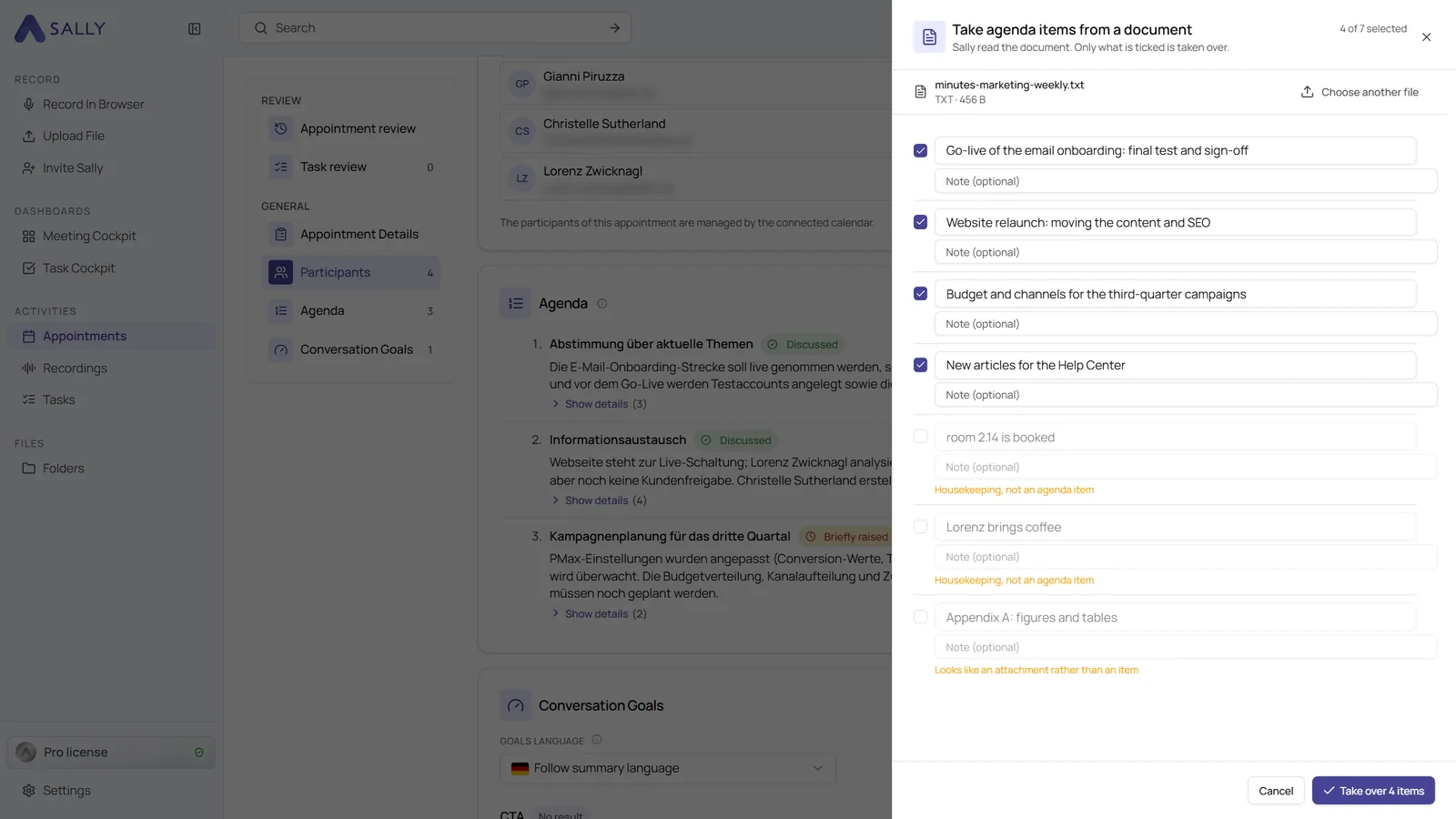
Sally only suggests what looks like an agenda item. Appendices and housekeeping notes come unticked, so you take over exactly what you need.
What's new?
- Take over from a document: in the Preparation tab of an appointment, as a button in the empty Agenda section or in the three-dot menu next to Add agenda item
- Common formats: PDF, Word, Excel and text files of up to 20 MB
- You decide: the suggestions appear in the same list as for the invitation. Untick what you don't need and confirm, for example with Take over 4 items
- In your language: Sally writes the items in the language of your Sally profile, even if the document is in another language
- Not stored: Sally only reads the document to find the items, the file is not stored with the appointment
Want the details? See Take items from a document.