September 14, 2026: Connect external MCP servers with your own client ID or client credentials
· 2 min read

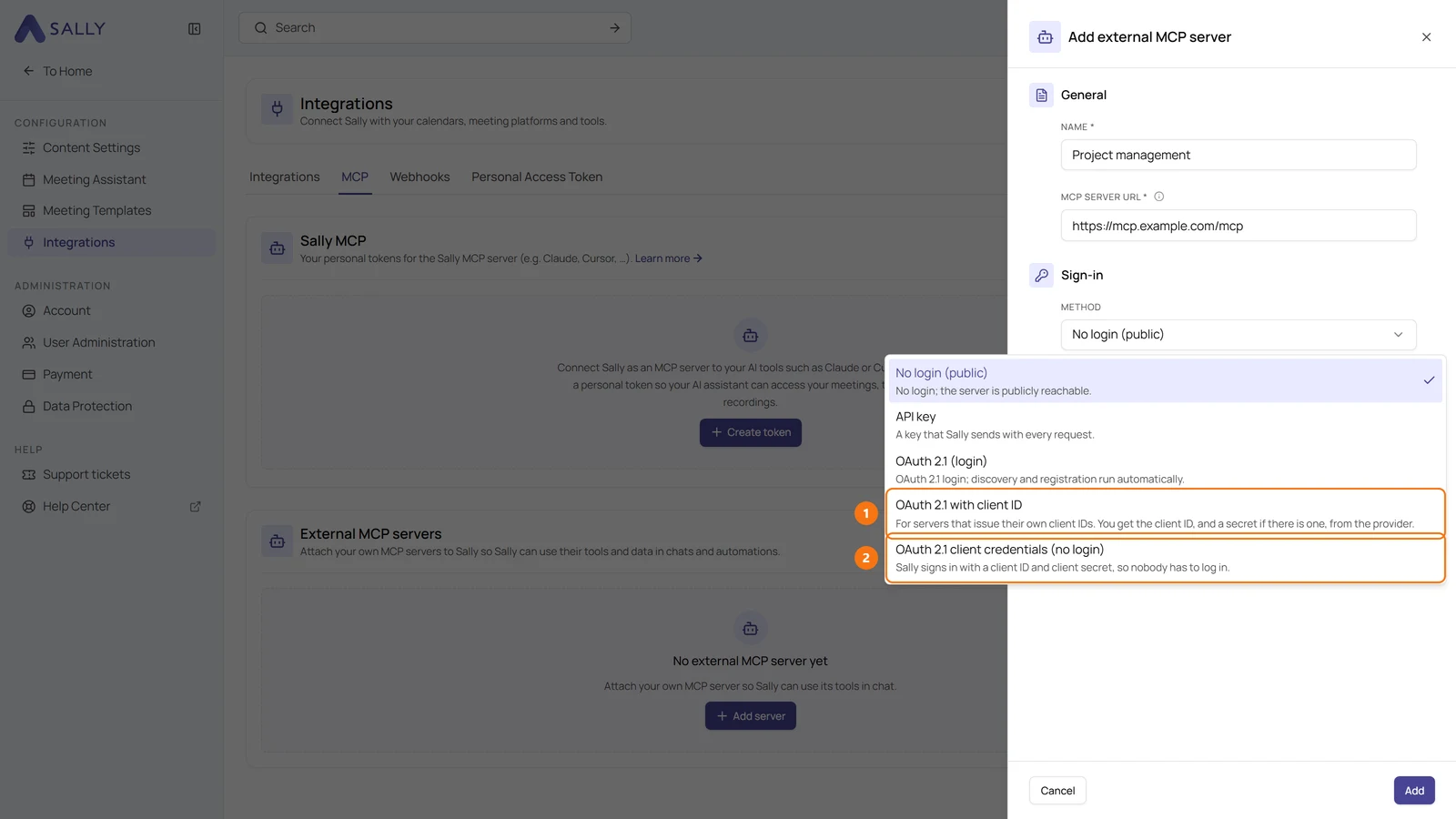
Sally now connects to MCP servers that do not register clients automatically. Two new sign-in methods for external MCP servers make this possible: OAuth 2.1 with client ID and OAuth 2.1 client credentials (no login).
Some providers, such as MeisterTask, only issue client IDs on request. Until now, Sally could not connect to their servers. Now you enter the client ID from the provider, and Sally uses the server's tools in chats and automations.
What's new?
- OAuth 2.1 with client ID: for servers that issue client IDs themselves. Copy Sally's Redirect URI, enter it at the provider and fill in the Client ID and, if there is one, the client secret
- OAuth 2.1 client credentials (no login): Sally signs in as an application with client ID and client secret. Nobody has to log in, and Sally renews the access token itself
- Clear error messages: if the provider rejects the sign-in, Sally still saves the server and tells you the reason, for example
invalid_client - Secrets stay hidden: Sally never shows a saved client secret again. Leave the field empty when editing to keep it
How to switch
If connecting with OAuth 2.1 (login) fails with the message that the server issues client IDs only on request, edit the server and select OAuth 2.1 with client ID as the method.
Want the details? See Connect Sally with MCP.