October 23, 2026: Plan a meeting agenda and see what came of each item
· 3 min read

Plan your meeting with an agenda, and Sally tells you afterwards what came of each item: whether it was discussed, what the outcome was and where in the recording it was talked about.
That way you see at a glance what got done and what is still open, without listening to the whole recording again. You write the agenda by hand or take it over from the invitation or from the last meeting of the series.
What's new?
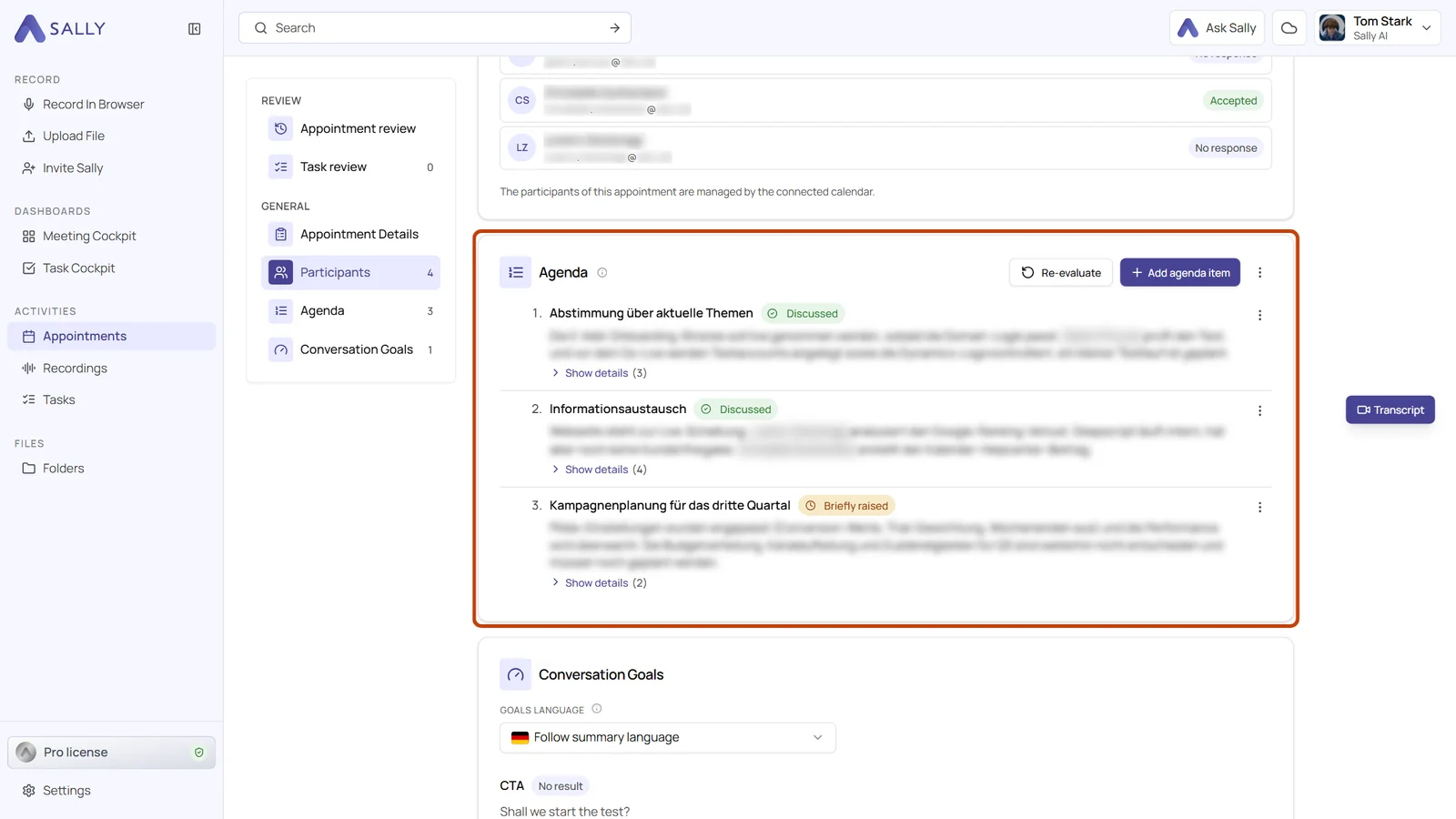
- Agenda in the Preparation tab: open the appointment and switch to the Preparation tab. The Agenda section sits above the Conversation Goals. Click Add agenda item, enter a Title and optionally a Note on what you want to know about the item
- Take over from the invitation: Sally reads the invitation text and suggests the items it finds there. Only what you tick is taken over
- Take over from last time: Sally shows the agenda of the previous appointment of the series. Items that stayed open are preselected, completed ones are not
- A status for every item: after the meeting, each item shows whether it was discussed, only briefly raised or not discussed, plus two or three sentences on what it produced
- Outcomes with their place in the recording: Show details lists the individual outcomes, decisions and next steps, each with the point in the recording where it was said
- Re-evaluate: if you add, edit or remove items after the meeting, Re-evaluate evaluates the current agenda again. That way you can also add an agenda to a meeting that is already over
Good to know
- Your summary stays untouched: the agenda is evaluated in a run of its own. Your summary does not change, and applying a different meeting template later leaves the agenda results alone
- One agenda for the whole meeting: the agenda belongs to the online meeting, not to a single person. Everyone in your organization who has the same meeting in their calendar sees the same agenda
- One instruction for the whole organization: owners and admins can tell Sally how to write the agenda results, for example how long they should be. You find it under Settings › Meeting Assistant › Agenda in How Sally evaluates the agenda, with up to 2,000 characters. The instruction cannot change whether an item counts as discussed, so the status means the same in every meeting
Want the details? See How to plan an agenda and see what came of each item.