February 19, 2026: Speaker list
· 2 min read

Assigning speakers in transcripts and summaries is now easier than ever. 🎉
Instead of manually editing names in the text, you can simply select the correct speaker from a dropdown list.
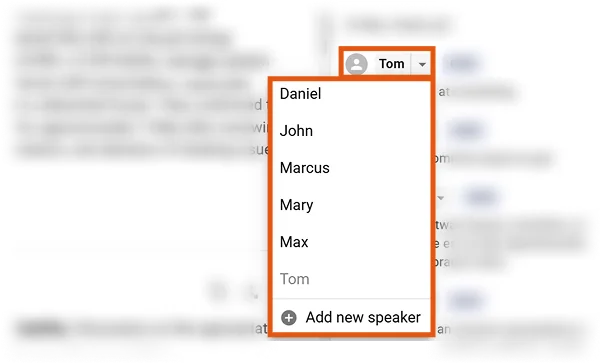
The speaker list is automatically generated from the names Sally detects during the meeting.
If a name is missing, you can easily add it yourself.
Edit and manage speakers
You can now manage all detected speakers in one place.

What you can do
- Select a speaker for any transcript block using the dropdown
- Automatically use names Sally detected during the meeting
- Add missing speakers manually
- Quickly review all participants in the Edit Speakers panel
Regenerate the summary
After adjusting the speakers, you can regenerate the meeting summary.
This ensures the final summary correctly reflects who said what, resulting in clearer documentation and better meeting notes.
Full guide
If you'd like to learn how to review and correct speakers in transcripts, you can find the complete guide here: