October 9, 2026: Video and transcript in full screen
· 2 min read

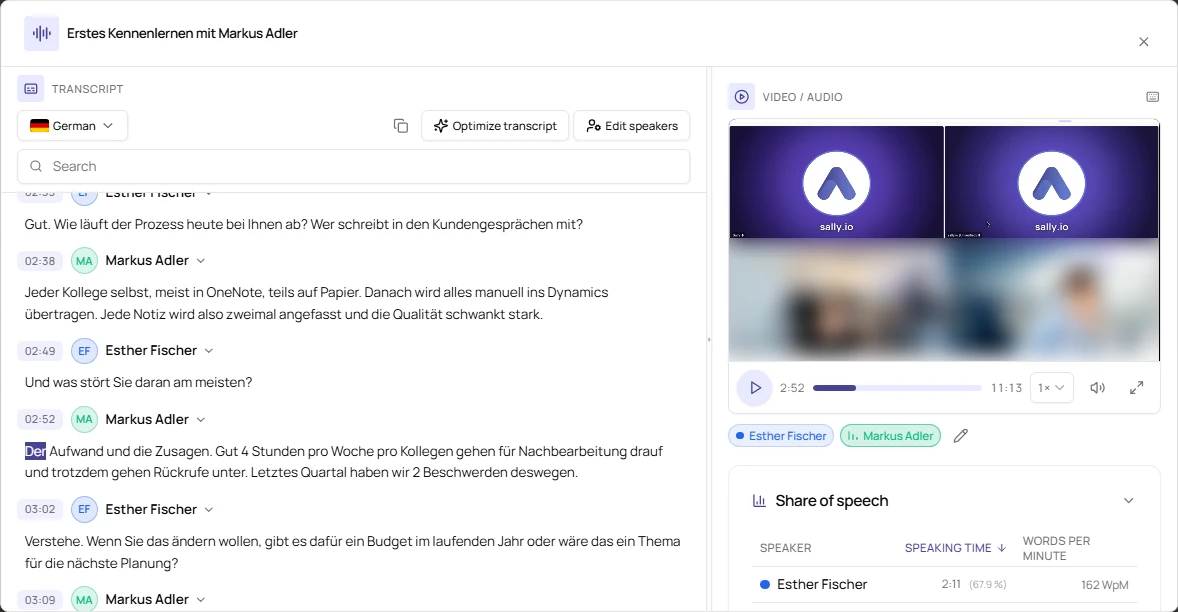
More room for video and transcript: the full screen view of the transcript has been reworked. The video grows as you drag the divider, the speakers sit right below it, and a double-click on any word plays the recording from exactly that point.
This helps most when you listen back to a long meeting and correct the transcript as you go.
What's new?
- Resizable video: drag the divider between transcript and recording to make the video larger or smaller. Double-click the divider to restore the original layout
- Speakers below the video: every speaker appears below the video in their own color, and whoever is speaking is highlighted. Click a name to jump to that person's next contribution, or use the pencil to open Edit speakers
- Play from a word: double-click a word to start playback right there. A single click still edits the text as before
- Search highlights matches: search no longer hides parts of the transcript. It highlights and counts the matches instead, and the arrows or the Enter key take you from one match to the next
- Keyboard shortcuts: the space bar starts and stops playback, and the arrow keys jump 5 seconds back or forward
- Collapsible share of speech: the share of speech is now a single row that you expand when you need it
- Same position: full screen picks up the position and speed from the sidebar and hands them back when you close it
Want the details? See Transcript in full screen.