November 12, 2026: New rules for attendance and emails
· 3 min read

You now decide in more detail when Sally joins and who gets her emails. Three new settings cover meetings that the previous options did not fit: attendance depending on the host, a summary email you can stop for one meeting, and a privacy notice that only goes out when someone from outside is invited.
A weekly sync among colleagues no longer needs the same treatment as a call with a customer, and a confidential summary stays in Sally without you switching the email off for every meeting.
Attendance depending on the host
- Only when the host is internal: Sally joins every meeting organized by someone from your company, even with external guests, and skips invitations from outside
- Only when the host is external: Sally joins whenever a customer or partner invites you, while you invite her to your own meetings yourself
- Seven modes: both options sit next to the existing modes under Settings > Meeting assistant > Bot settings > Automatic meeting attendance
Summary email for a single meeting
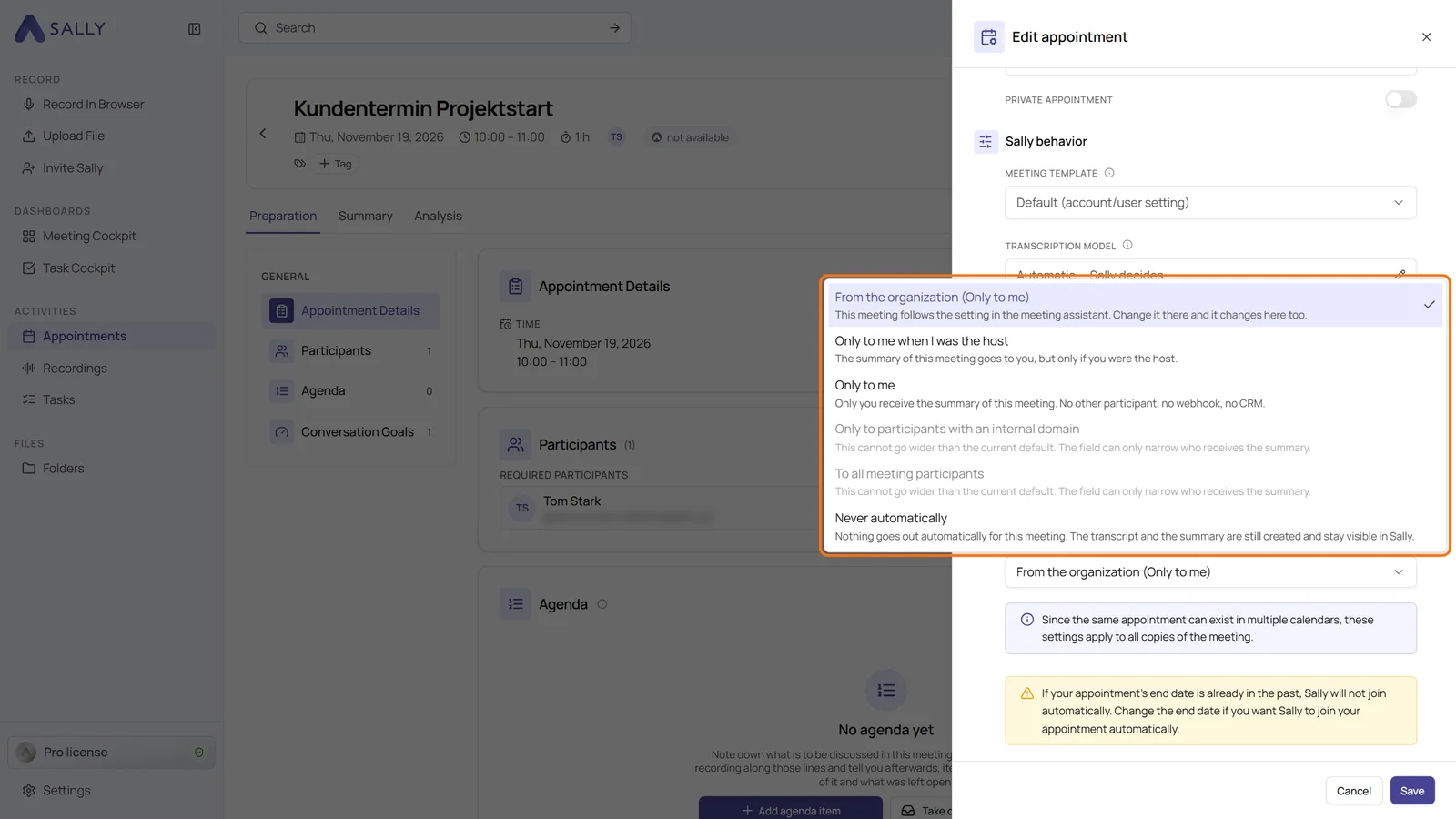
- Narrow it or stop it: in Edit appointment, the Automatic summary email field in the Sally behavior section limits the email for this meeting, for example to Only to me or Never automatically
- Transcript and summary stay: only the automatic email is held back, both are still created and visible to you in Sally
- Only narrower, never wider: options that would reach more people than the meeting assistant allows are greyed out, and the narrowest choice of all Sally users in the meeting wins
Privacy notice only where it is needed
- Email notice: which meetings: a new field in the Privacy notice by email before meetings section under Administration > Data Protection > Duty To Inform
- Only with external participants: purely internal meetings get no email, and Sally joins them without consent, in opt-in mode too
- Only for meetings from outside your own Microsoft tenant: Teams meetings organized within your own tenant get no email. Sally recognizes the tenant through your verified internal domains
- An objection always counts: anyone who objected to Sally still keeps her out, even in a meeting without an email
Want the details? See Automatic meeting attendance, Restrict or stop the email for one meeting and Which meetings get the email.