How to optimize your meeting transcription in Sally AI
You can optimize an existing transcription and have Sally write it again, for example with a different AI model, a corrected number of speakers or the right meeting environment.
That lifts the quality noticeably, and you do not have to record the meeting again.
Quick navigation
1. Optimize & regenerate transcription
- Open Recordings in the sidebar and click the recording you want to optimize.
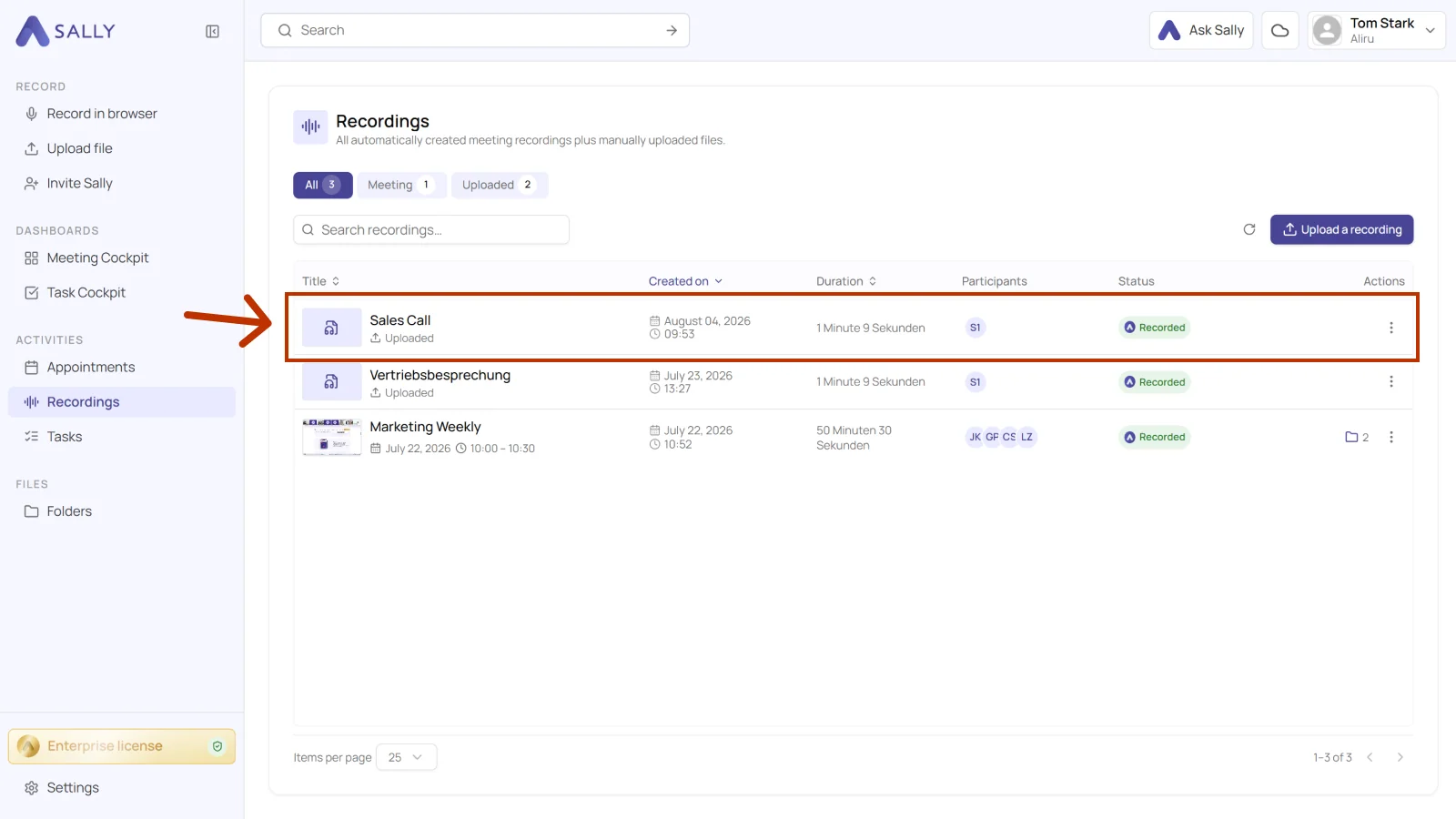
Recordings holds both your meeting recordings and the files you uploaded yourself. For a meeting, you can also start from Appointments.
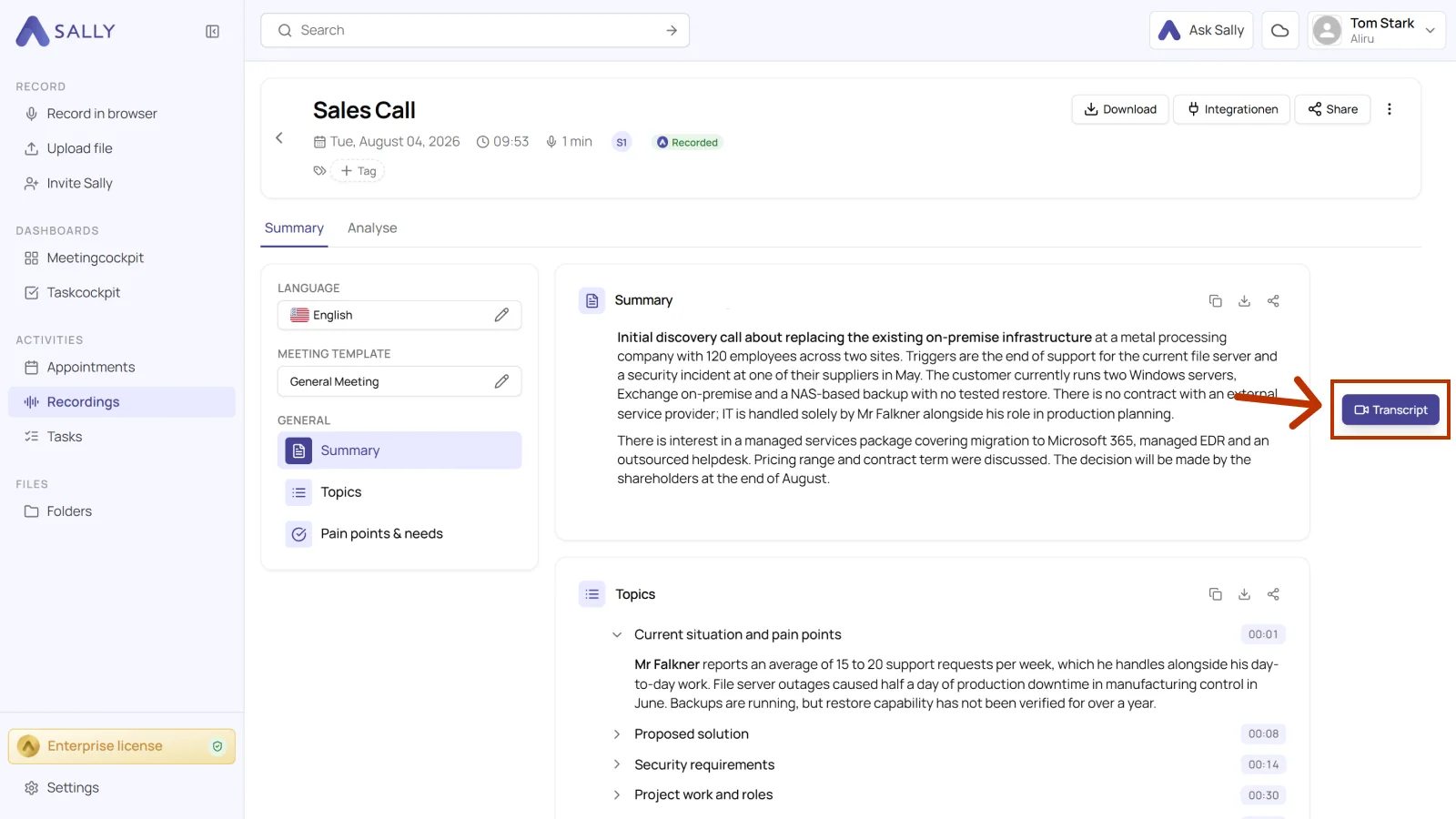
- Click the Transcript button next to the summary.
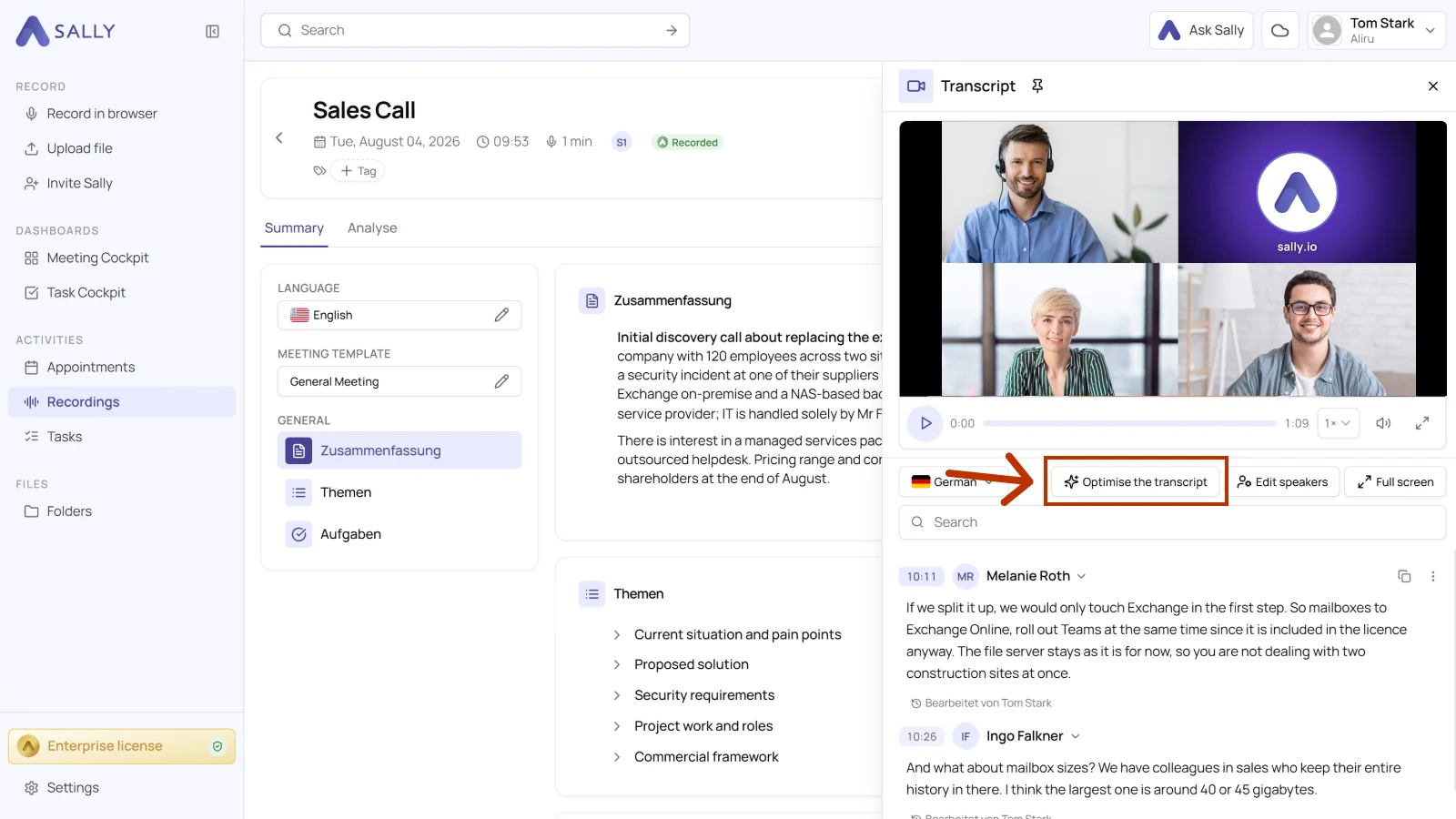
- Click “Optimise the transcript”. This opens the settings menu.
- In the settings window, you decide how Sally should create the new transcription. Above the fields, “Last transcription settings” shows which settings were used last time. The table below explains every setting.
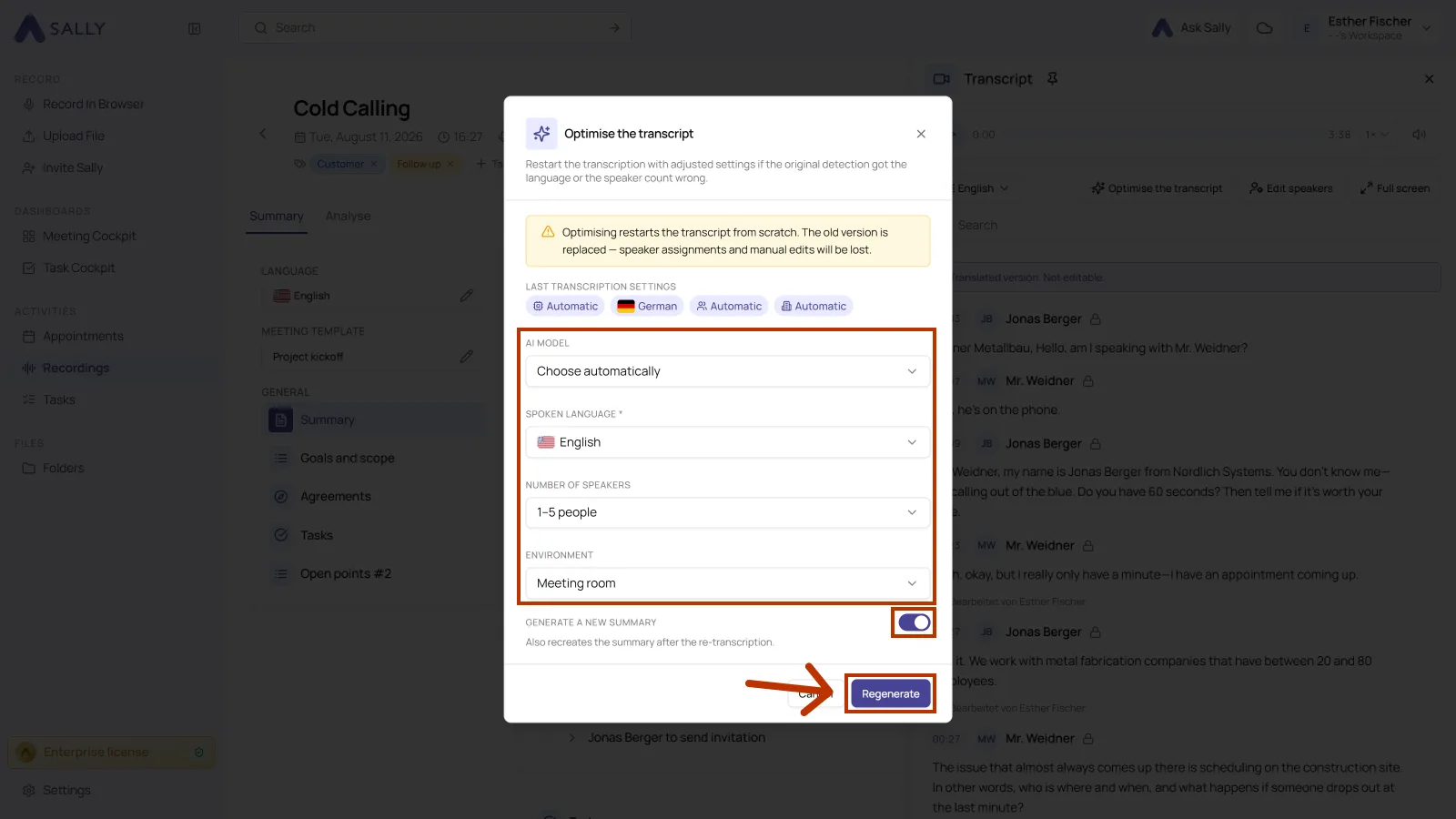
Optimizing restarts the transcript from scratch. The previous version is overwritten, and speaker assignments and manual edits are lost.
| Setting | Explanation | Options |
|---|---|---|
| AI model | The AI model determines how precise and robust Sally's transcription will be. Depending on the language, environment, and audio quality, different models can produce significantly better results. Choose the model that matches your situation best. All models run entirely on the Sally platform. Which of them you can pick depends on your plan, compared under AI models. | - Choose automatically: Sally picks the matching model for this recording. - Jade v1: Our most detailed model, and the one that stays closest to the spoken word. It transcribes verbatim, including filler words such as "uh" and "um" and non-verbal cues such as "(laughs)". For qualitative interviews and sensitive conversations. - Jade v2: Like Jade v1, with clearly better speaker separation. For verbatim records of conversations with several people. - Opal v1: Our all-round model for everyday meetings. It produces a clean, easily readable transcript that concentrates on what was actually said, without filler words or non-verbal sounds. - Topaz v1: The previous generation of the Topaz model. A clean, clear transcript without filler words or non-verbal sounds, with strong speaker separation. - Topaz v2: Our most precise model. It offers the strongest speaker separation and stays robust with loud recordings and many participants. Ideal for meetings and workshops with several speakers. |
| Spoken language | Select the language used in the meeting. Choosing the correct language greatly improves accuracy. | Any of our 103 supported languages |
| Number of speakers | Determines how well Sally can tell the voices apart. The correct number noticeably improves how she separates the speakers. | - Detect automatically - Specify exact number - 1-5 people - 6-10 people - 11-15 people - 16-20 people - 21-25 people - More than 25 people |
| Environment | Helps Sally pick the right acoustic profile. The closer the match, the better the quality, above all in noisy or echo-heavy rooms. | - Detect automatically - Field recording / on-site - Office - Dictation - Interview (face-to-face) - Conference / panel discussion - Media production / podcast / studio - Meeting room - Online meeting - Phone call / call center / hotline - Unknown environment - Presentation / lecture / seminar / classroom |
| Generate a new summary | Writes the meeting summary again from the new transcription. Useful when the first transcript had errors or missed context. | Toggle (on/off) |
- Click "Regenerate".
Sally now redoes the transcription with your settings.
That takes a few moments, and you can come back and run it again whenever you want.
2. Best practices for accurate transcription results
Sally works from the recorded audio.
The clearer the structure of your meeting and the better the sound, the more accurate all of this gets:
- Transcript
- Speaker identification
- Summary
- To-dos and decisions
These tips get you good results from the start and help you avoid the usual pitfalls.
2.1. Introduce all participants by name at the beginning
A quick round of introductions makes speaker identification much better, above all in long meetings or meetings with many participants.
Ask all participants to briefly introduce themselves at the beginning.
Example:
“Hi, I'm Anna Müller from Marketing.”
“My name is Tobias Schneider, Sales.”
The clearer each voice is at the start, the cleaner the speakers stay apart later in the transcript.
2.2. Clearly announce the agenda and topic changes
Sally handles meetings best when they follow a clear structure with the topics kept apart. Ideally one person runs through the agenda at the start and says out loud when the topic changes.
Examples:
“Today we'll cover three points: budget, timeline, and responsibilities for the upcoming CRM project.”
“Now let's move on to the budget.”
“Let's continue with the next topic: implementation.”
Spoken structure helps Sally split the transcript properly and sharpens the summary.
2.3. Avoid speaking at the same time
When several people talk at once, Sally cannot tell who said what.
- Only one person should speak at a time.
- If interruptions happen, pause briefly and continue one after another.
- Decisions should be clearly summarized by one person at the end.
Example:
“To summarize: The deadline is March 15, and Max is responsible.”
A clear closing statement lifts the quality of the summary a lot.
2.4. Speak clearly and at a consistent pace
Fast, unclear or mumbled speech makes transcription errors more likely.
- Articulate clearly.
- Speak at a natural pace.
- Insert short pauses between sentences.
- Pronounce technical terms clearly and completely.
For important decisions or to-dos, say them slowly and clearly.
2.5. Use a high-quality microphone
Audio quality is one of the most important factors for accurate transcripts.
- Use a headset or external microphone instead of your laptop's built-in mic.
- Keep the microphone approximately 15–25 cm (6–10 inches) from your mouth.
- Make sure Bluetooth devices have a stable connection.
- Avoid changing your distance from the microphone while speaking.
The clearer and closer the audio signal, the more accurate the speech recognition.
2.6. Reduce background noise
Background noise pulls the recognition accuracy down.
- Choose a quiet room.
- Close windows and doors.
- Mute yourself when not speaking.
- Avoid typing or paper noise while others are speaking.
- Use noise-cancelling headphones if necessary.
Steady noise from fans, building sites or conversations in the background costs you transcription quality.
2.7. Avoid echo and reverberation
Strong room echo makes speech separation more difficult.
- Use rooms with carpets, curtains, or soft furniture.
- Avoid large, empty conference rooms.
- Make sure multiple devices in the same room are not unmuted at the same time (feedback loops).
Echo can cause statements to appear duplicated or distorted in the transcript.
2.8. Do not switch languages during the meeting
Sally works most reliably when the meeting stays in one language.
- Stick to one language throughout the meeting.
- If you need several languages, split them into separate meetings or recordings.
Switching back and forth costs word accuracy.
2.9. Test your setup before important meetings
A short test beforehand prevents most audio problems.
- Start a brief test call.
- Check microphone quality and volume levels.
- Confirm that the correct microphone is selected.
- Make sure Sally is properly added to the meeting.
Two minutes of testing save you a lot of clean-up later.