October 14, 2026: Decide who can delete recordings
October 14, 2026: Decide who can delete recordings
· One min read
Gianni Piruzza
Marketing Manager

More control over your recordings: owners and admins can now decide who is allowed to delete recordings in their organization. Until now, anyone with access to a recording could delete it for every participant.

This is useful if recordings have to be kept, for example for documentation, or if you want to make sure nobody deletes a recording by mistake.
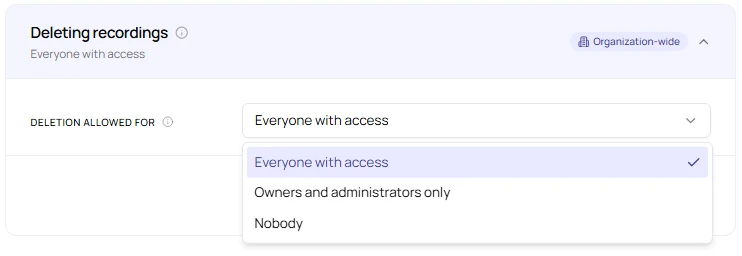
Open Deleting recordings dropdown with Everyone with access, Owners and administrators only, and Nobody
Choose who can delete recordings

What's new?​

  • Deleting recordings: a new section in the privacy settings, under Storage Limitation
  • Three options: Everyone with access (the default, same as before), Owners and administrators only, or Nobody
  • Clear feedback: anyone who is not allowed to delete sees Delete grayed out, along with a short explanation
  • Not affected: automatic deletion and replacing a recording when Sally joins again or a file is uploaded work as before
  • Where to find it: Settings → Data Protection → Storage Limitation

Want the details? See Who can delete recordings.
Security & admin

Access to all recordings

Owners can give selected members read access to every recording of the account, in Sally, through MCP and the API. Impersonation gets its own switch.

Integrations

Manage licenses via the API

Read the license usage per member, take licenses away and adjust subscriptions via the Sally API. Plus a breaking change to the files path.

Integrations

ClickUp, transcript search and invites

Send every task of a meeting to ClickUp at once, correct words right in the transcript search and invite Sally to appointments you already have.

Summaries & AI

Prompts in your language

Write meeting template prompts in your own language, Sally runs them from an English version. Plus 42 ready-made templates and a new export format.

Transcription

Topaz v3, our most accurate model

Topaz v3 is Sally's new and most accurate transcription model, with over 30 languages and your vocabulary. Automatic now transcribes with Topaz v3.

Recording

Pause the recording in a meeting

Pause Sally's recording during a meeting and resume it later while Sally stays in. The paused part is left out of recording, transcript and summary.