November 18, 2026: Topaz v3, our most accurate model
· 2 min read

Sally has a new transcription model: Topaz v3, the newest generation of Topaz and our most accurate model. It writes a clean transcript without filler words, recognizes more than 30 languages natively and pays particular attention to the terms in your custom vocabulary.
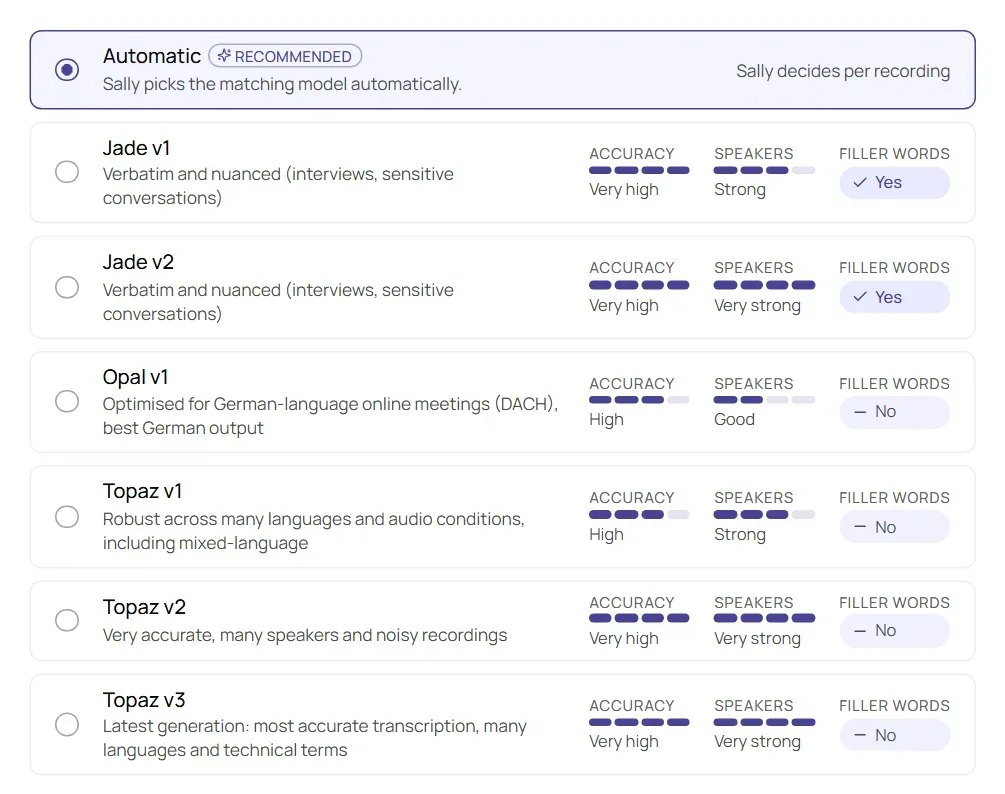
Automatic now transcribes with Topaz v3. If your default is set to Automatic, your new recordings use it right away, without you changing anything.
What's new?
- Topaz v3 as the sixth model: it transcribes more accurately than Topaz v2, with very high accuracy, very strong speaker separation and fast processing. Like the other Topaz models, it leaves out filler words
- Technical terms from your vocabulary: Topaz v3 gives extra weight to the terms in your custom vocabulary, so product names, abbreviations and specialist terms come out right more often
- More than 30 languages: Topaz v3 recognizes them natively, which suits international teams
- Automatic uses Topaz v3: Automatic stays the recommended default. If Topaz v3 is ever unavailable, another model takes over, so the recording still gets its transcript
- In every plan: like the other five models, Topaz v3 is included in every plan, from Starter to Enterprise
- Wherever you choose a model: as the organization default in the meeting assistant, for a single appointment and when you optimize a transcript that already exists
What happens to your current setting?
- Your default is Automatic: nothing to do, new recordings use Topaz v3
- You set a fixed model: it stays in place. If your organization has Topaz v1 set as its default, for example, nothing changes until you switch it in the meeting assistant
- Transcripts that already exist: they keep the model they were written with. To have one of them written again with Topaz v3, optimize the transcript and pick Topaz v3
How Topaz v3 compares with the other models is under Sally AI models compared.