October 6, 2026: Tables, follow-ups and email drafts
October 6, 2026: Tables, follow-ups and email drafts
· 2 min read
Gianni Piruzza
Marketing Manager

From summary to next step: meeting templates now have three new section types. Table, Follow-up appointment and Email deliver structured results that you can work with right away, instead of plain text.

A table with columns you define collects open items with owner and due date, the same way in every meeting. An agreed follow-up meeting becomes an appointment or a calendar file in one click. And the follow-up email is already drafted, with recipients, subject and body.
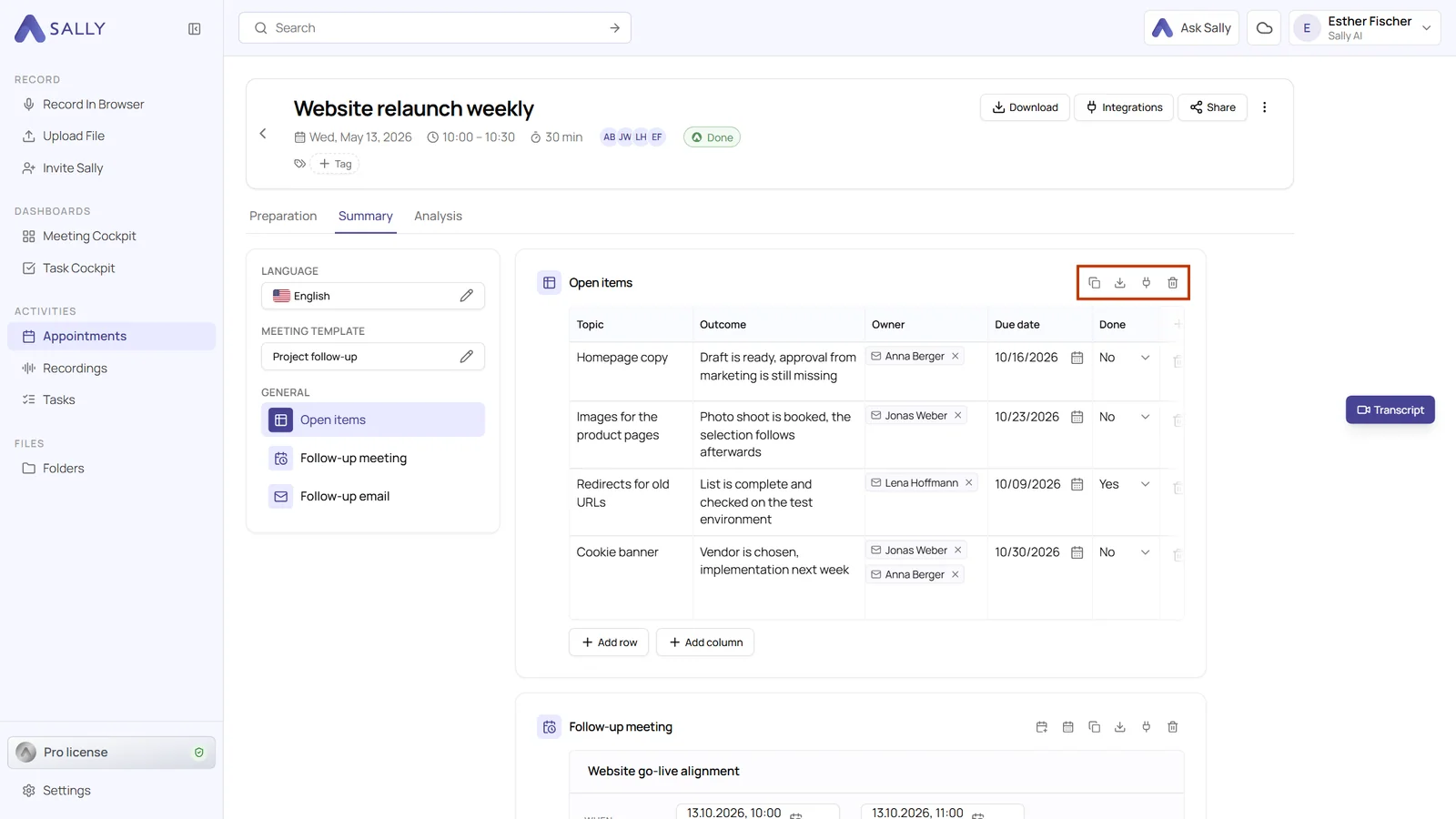
A table section in the summary with the columns Topic, Outcome, Owner, Due date and Done
A table with fixed columns in the summary

What's new?​

  • Table: you define the columns and choose one of seven types for each, for example Person, Date or Yes/No. Every cell can be edited, and in PDF, Word and ODT the table is a real table
  • Follow-up appointment: Sally records an agreed follow-up meeting. One click creates the appointment in Sally, or you download it as an .ics file for your calendar
  • Email: Sally drafts the follow-up email in the tone of the meeting. Open it in your email program or download it as an .eml file. Nothing is sent without you
  • Where: in every meeting template, in the Fixed result group under Add section

Want the details? See Table, follow-up and email.
Recording

Pause the recording in a meeting

Pause Sally's recording during a meeting and resume it later while Sally stays in. The paused part is left out of recording, transcript and summary.

Organize

Find meetings faster

Highlight appointments with a recording or tag in the calendar, move a recording to another appointment and find recordings from the Sally app as audio files.

Integrations

Capacities, SharePoint and Asana

Save meetings to Capacities, file summaries and transcripts in SharePoint automatically and send all tasks of a meeting to Asana at once. Plus team automations.

Recording

New rules for attendance and emails

Let Sally join meetings depending on the host, stop the summary email for a single meeting and send the privacy notice only when external guests take part.

Security & admin

A separate email for invoices

Send Sally invoices and payment receipts to their own billing email, for example your accounting team, while notifications keep going to your contact address.