October 2, 2026: Stop Sally from assessing individual people
· 2 min read

You decide whether Sally may judge individual people: the new Assessment limits card in the meeting assistant blocks assessments of individual people for your whole organization.
Organizations with a works council often need this. Until now, anyone could write an instruction that asked Sally to rate how a participant performed, behaved or felt, and Ask Sally answered such questions as well. With the limit turned on, Sally sticks to what was said.
What's new?
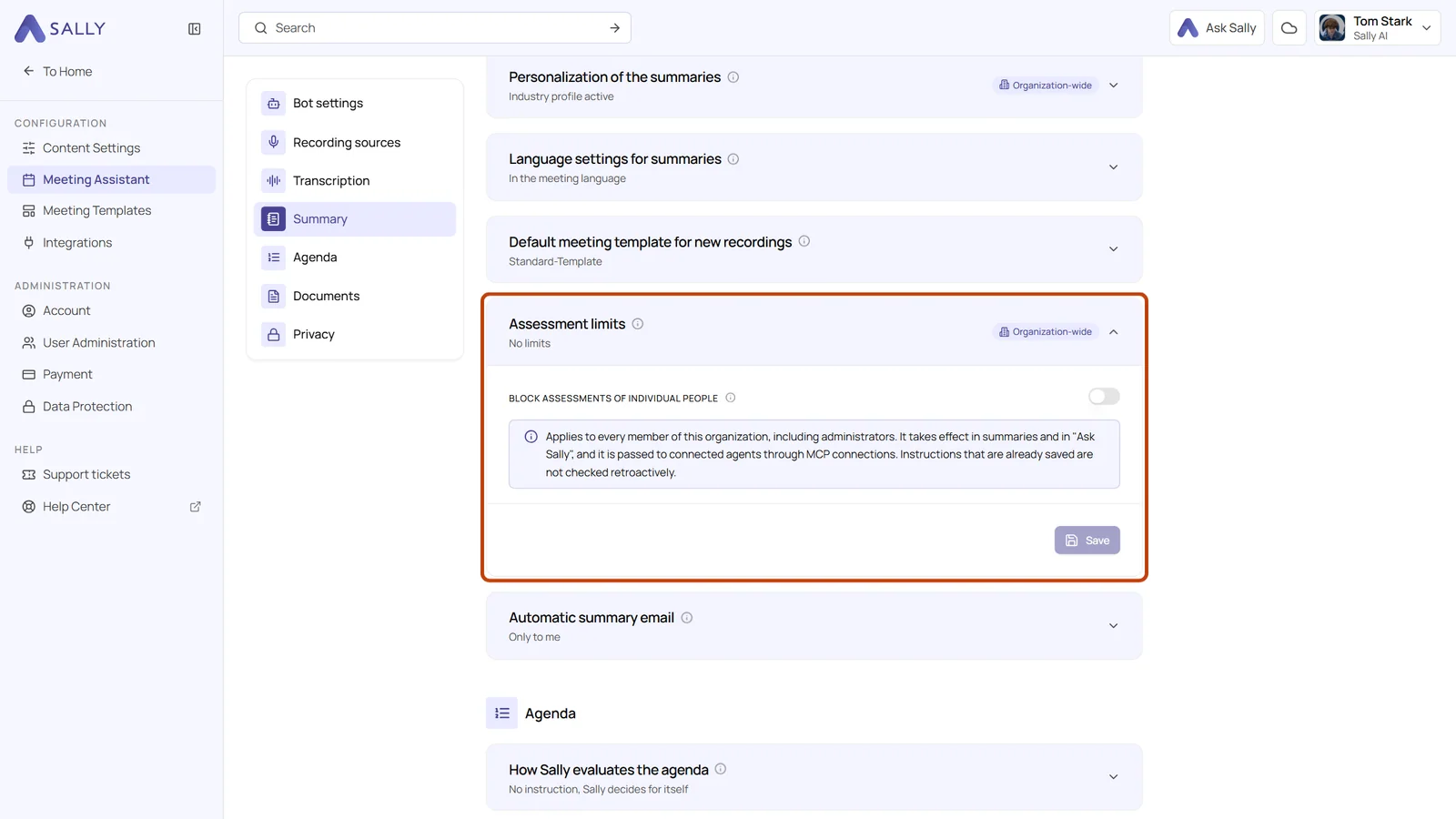
- New setting: under Settings › Meeting Assistant › Summary you find the Assessment limits card. Turn on Block assessments of individual people and click Save. The card then no longer reads No limits
- Instructions are checked: a free instruction that asks Sally to assess individual people, for example in the prompt of a template section or in a custom insight, is rejected when you save it
- Summaries assess no one: Sally reports what was said, but does not judge how individual people performed, behaved or felt
- Ask Sally and connected agents follow: the limit applies in Ask Sally, and AI agents connected through MCP receive it as an instruction
- Applies to everyone: the setting covers every member of your organization, administrators included
Instructions that were saved before you turn the setting on are not checked retroactively. Look through your existing prompts and custom insights once after switching it on.
Want the details? See Assessment limits.