Professional secrecy: store data separately
Anyone bound by professional secrecy under § 203 of the German Criminal Code, so lawyers, notaries, doctors, psychotherapists, tax advisors and the other professions listed there, can have their Sally data stored on a separate server. Only other professional secrecy holders are stored on it, no other customers.
This guide shows you where the classification lives in Sally, which details we need in order to check it, what happens between your request and the finished move, and how your account behaves while the data is on its way.
The classification applies organization-wide. Only the owner of the company account can request it and edit the details, because it is a contractual decision. Admins and members see the card, but cannot change it.
Quick navigation
- What the classification means
- Request the classification
- What happens after your request
- While your data is being moved
- Change your details
1. What the classification means
A classified account is not stored on the same database and file storage as everyone else. Meeting data, recordings, transcripts and summaries move to a separate environment that is reserved for professional secrecy holders. The move covers everything your account already holds, without exception, including everything created before the classification. Nothing stays behind on the previous server.
| Entry | What applies |
|---|---|
| Classification | Professional secrecy holder |
| Legal basis | § 203 StGB, with the subsection of your profession, for example § 203 Abs. 1 Nr. 3 StGB for lawyers |
| Data storage | Separate server, professional secrecy holders only |
| Data center | Hetzner, Falkenstein, Germany |
| Confidentiality obligation | Part of your data processing agreement (DPA) |
Two points are worth spelling out, because chambers and supervisory bodies ask about both.
It says separate, not exclusive. Your data is not alone on a machine, it sits together with other professional secrecy holders and separately from all other customers. That is exactly what the card states, so you can pass the wording on unchanged.
The confidentiality obligation is in the DPA. Under § 203 Abs. 4 StGB you have to make sure that everyone contributing to your work is bound to secrecy. Sally commits to this in the data processing agreement, so there is no second certificate to collect and keep in sync. This also means a concluded DPA is a precondition for the classification. If you do not have one yet, request it in the same step.
The card names the provider and the location, but no IP address. An address would be wrong the moment a server is replaced or a second one is added, and it would point at the machine holding the most sensitive data we store. What a supervisory body needs is the country of processing under Art. 28, Art. 30 and Art. 44 ff. GDPR plus the confidentiality obligation, and both are on the card.
2. Request the classification
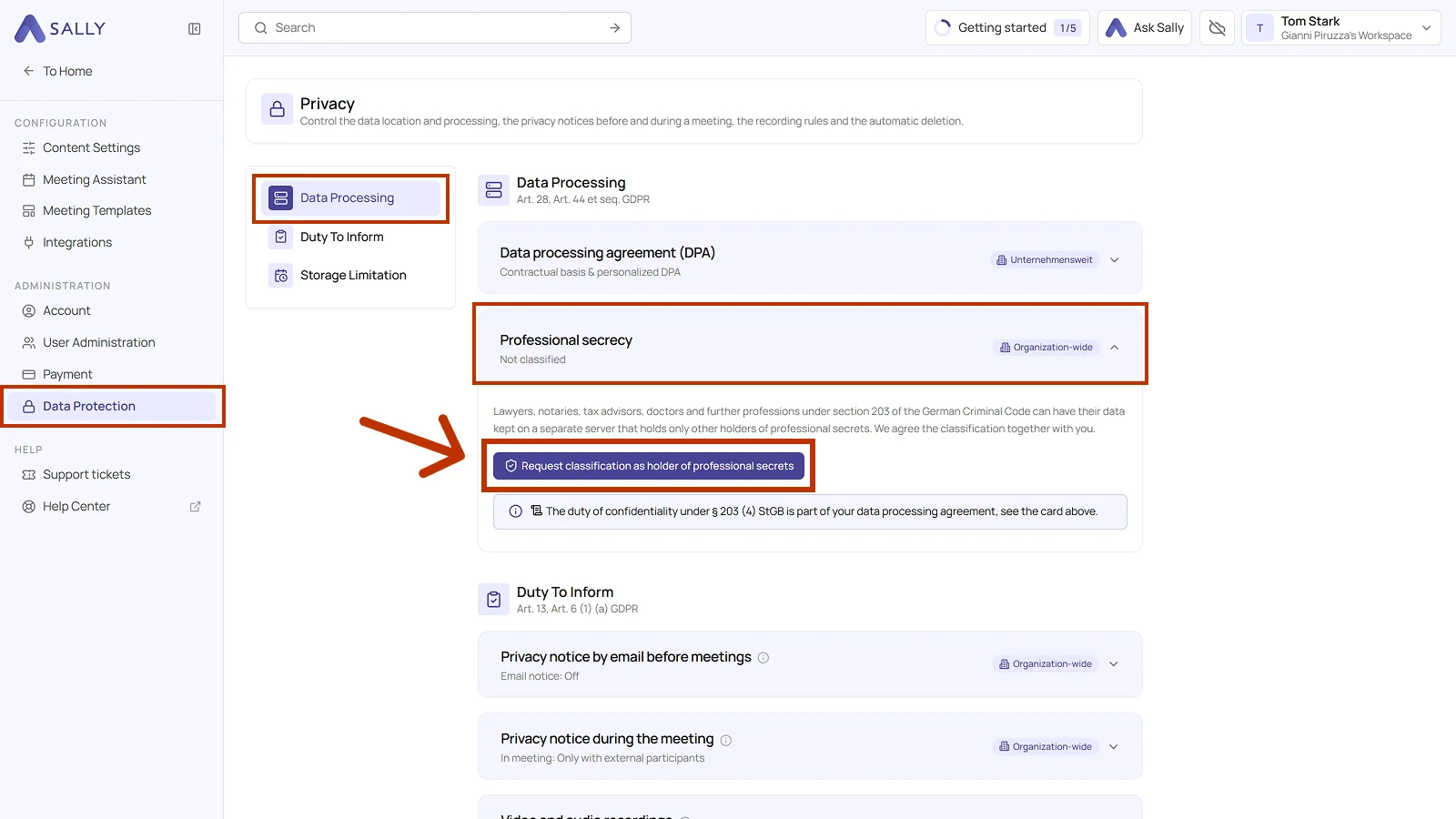
You request the classification inside Sally, on the Professional secrecy card in the privacy settings of your company account. Four clicks take you there, and what waits at the end is a short form with four entries and one confirmation. Everything after that is on us.
- Open Settings at the bottom of the left sidebar.
- Under Administration, open Data Protection and pick Data Processing on the left.
- Open the Professional secrecy card. As long as your account is not classified, it reads Not classified.
- Click Request classification as holder of professional secrets. A panel opens from the right.
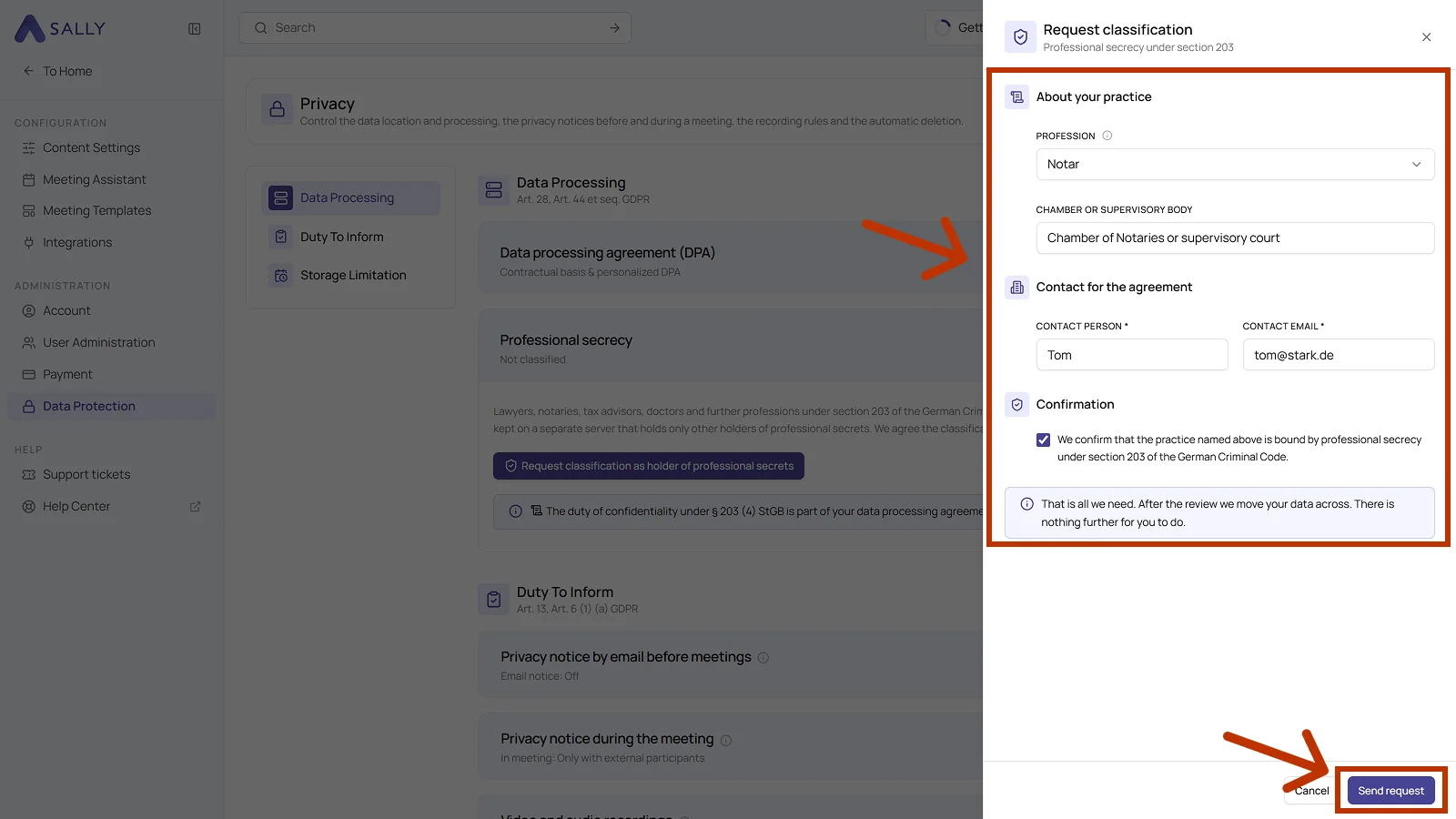
- Fill in the details, tick the confirmation and click Send request.
That is everything on your side. You do not have to prepare a server, schedule anything or send documents afterwards.
From there it is on us, in three steps:
- Review. We check your profession against § 203 Abs. 1 StGB and settle the commercial side. A concluded DPA is a precondition, so if you do not have one yet, request it alongside.
- Setup. Once the classification is approved, your account gets its place on the separate server and your data moves over in the following night.
- Contact. We open a support ticket for your request. Questions, the approval and a possible rejection with its reasons all run through it, so there is nobody you have to write to.
How each of those steps shows up on the card is under what happens after your request.
| Field | Required | What belongs in it |
|---|---|---|
| Profession | Yes | Your profession as listed in § 203 Abs. 1 StGB, for example lawyer, doctor or tax advisor. The classification stands on this entry |
| Chamber or supervisory body | No | The body you answer to, for example a bar association, a chamber of notaries or a medical association |
| Contact person | Yes | Who we write to on contractual matters |
| Contact email | Yes | The email address of that person |
| Confirmation | Yes | Your confirmation that the practice named above is bound by professional secrecy under § 203 StGB |
3. What happens after your request
We check the profession against § 203 Abs. 1 StGB, clarify the commercial side, and schedule the move for the following night. You can follow every step in the same card, there is no need to ask.
| Card says | What it means | What you can do there |
|---|---|---|
| Not classified | No request has been made yet | Request the classification |
| Requested on 18 September 2026 | Your request is with us and is being checked | Review the details you submitted |
| Move scheduled for the night of 18 September 2026 | The classification is approved, the move has a date | See the date, ask questions in your support ticket |
| Move running, since 03:38 | Your data is being copied and checked | Nothing, everything is read only for a few minutes |
| Falkenstein, Germany, since 18 September 2026 | Done, your data is stored separately | Edit your details |
| Not classified, after a rejection | The classification was not granted | Request again, the reason is in your support ticket |
Your request opens a support ticket at the same time. Questions, the review and any rejection reason stay in that ticket, so the whole exchange is in one place.
The card tells you what happens next and who is up, not how long it will take. The review involves a legal and a commercial decision, and we would rather say nothing about timing than promise something we cannot hold.
4. While your data is being moved
The move runs at night and takes seconds to a few minutes, depending on how much you have recorded. Your account is not locked during that window, it is read only, and a banner above the page says so.
| What you do | During the move |
|---|---|
| Look at your calendar, recordings and summaries | Works as usual |
| Change, upload or share something | Declined, with a note pointing to the move |
| A meeting starts | Sally does not join, the appointment itself is kept |
| Sign in | Works as usual |
Until the copy is verified and switched over, the card still shows your previous storage location. That is deliberate: as long as the copy has not been checked, the old entry is the one that is true. Do not pass the new location on to your chamber before the card shows it.
5. Change your details
A contact person leaves, a chamber is renamed, a name is misspelled. Open the Professional secrecy card, click Edit details, change what is wrong and save. No ticket, no follow up. The confidentiality obligation in the DPA is untouched by it, because it exists between Sally and your company account, not between Sally and one person.
One field is the exception. If you change the profession, the change is saved, but the classification goes back into review, because § 203 Abs. 1 StGB lists the professions exhaustively and the whole classification rests on that entry. Your data stays where it is in the meantime, nothing is moved automatically.